In today’s fast-paced world, businesses are constantly seeking innovative methods to engage their customers and effectively deliver information. Digital signage has emerged as a powerful tool to grab attention and convey messages efficiently. However, many business owners are deterred by the high costs associated with traditional digital signage setups. What if there was a cost-effective solution that utilized existing technology? Fear not, because you can turn your regular TV into a digital signage solution for free. In this comprehensive guide, we’ll show you how to do just that using affordable digital signage software and solutions, enabling you to communicate more effectively without breaking the bank.
Digital signage refers to the use of display technologies like LCD, LED, or projection to present digital content such as images, videos, and information. This versatile medium is employed across various industries, including retail, hospitality, education, and healthcare, to enhance communication and improve the customer experience. By integrating digital signage into your business strategy, you can engage with your audience in a dynamic and visually appealing manner.
Digital signage allows businesses to display a wide array of content types, from promotional messages and advertisements to educational materials and real-time updates. Its adaptability makes it an excellent choice for businesses looking to tailor their messaging to specific audiences. As technology advances, digital signage continues to evolve, offering even more opportunities for creativity and interaction with customers.
Benefits of Digital Signage
- Increased Engagement: Dynamic content has the power to capture more attention than traditional static signs. Whether it’s an eye-catching video or a vibrant image, digital signage can draw in passersby and keep them engaged.
- Flexibility: With digital signage, you can easily update content as needed without incurring the cost of printing new materials. This flexibility allows you to keep your messaging current and relevant, ensuring that your audience receives the most up-to-date information.
- Cost-Effective: Over time, digital signage can prove to be more economical than traditional signage methods. By eliminating the need for constant reprinting, businesses can allocate resources more efficiently while still delivering impactful messages.
- Enhanced Customer Experience: Digital signage provides valuable information and entertainment to customers, enhancing their overall experience. By offering interactive and informative content, businesses can create a more engaging environment for their audience.
Affordable Digital Signage Solutions
While traditional digital signage systems can be costly, there are numerous budget-friendly alternatives that allow you to leverage existing technology—your TV. By repurposing a television set, you can create an effective digital signage solution without the need for expensive hardware investments.
Using Digital Signage Software
One of the most effective ways to turn your TV into digital signage is by utilizing digital signage software. These platforms offer a range of features that enable you to create and manage your digital content with ease. Many of these platforms provide free versions with basic functionalities, making them perfect for small businesses or those just starting with digital signage. Whether you’re looking to display simple image slideshows or more complex multimedia presentations, digital signage software can help you achieve your goals.
Digital signage software allows you to seamlessly integrate various content types, such as images, videos, social media feeds, and more, into your displays. With user-friendly interfaces and intuitive scheduling options, you can tailor your content to specific times of the day or week, ensuring that your messages reach your audience at the most opportune moments.
Popular Digital Signage Software
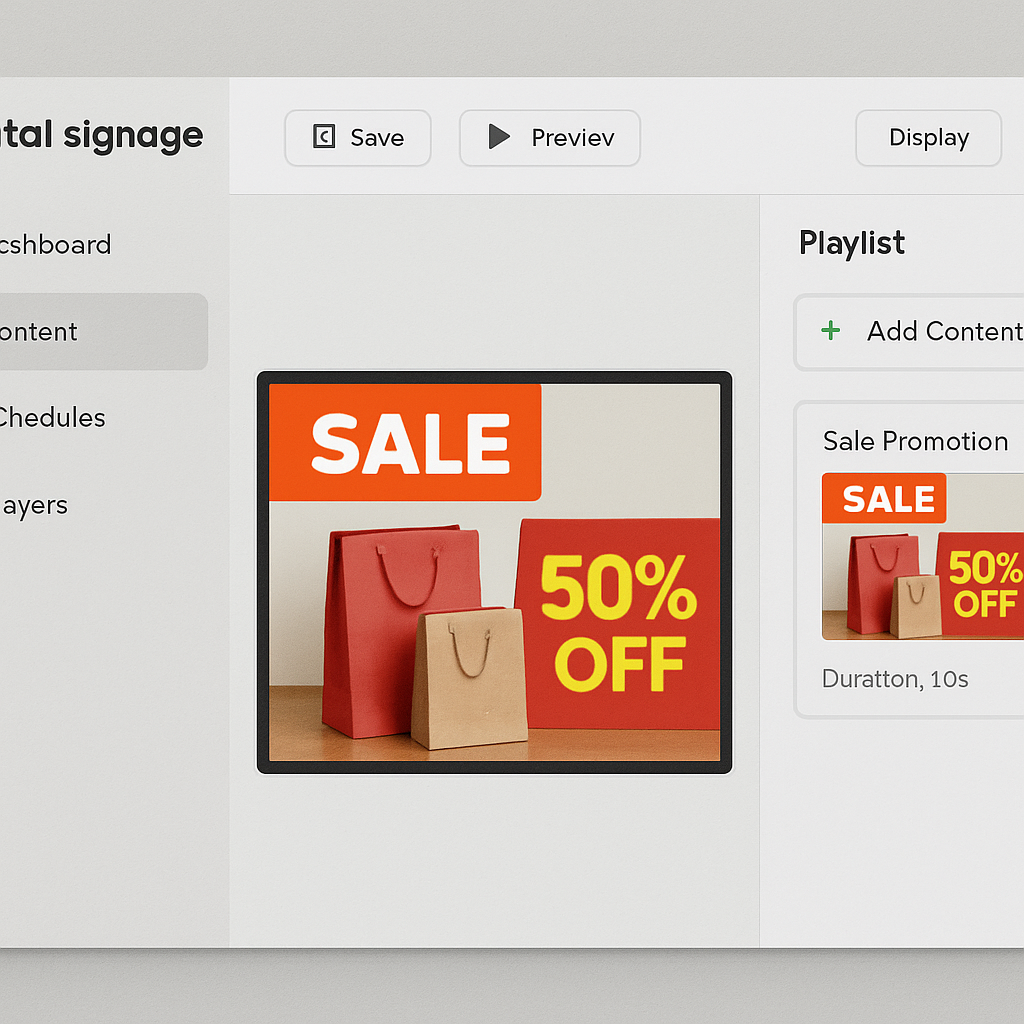
ScreenCloud: This platform offers a user-friendly interface with a wide range of templates. The free version provides essential tools for getting started, allowing you to create visually appealing displays without a steep learning curve. Whether you’re a beginner or an experienced user, ScreenCloud’s features make it easy to design and deploy digital content.
- XOGO: Known for its simplicity, XOGO allows you to create and schedule content directly from your smartphone or computer. Its straightforward setup and intuitive design make it an excellent choice for businesses looking to streamline their digital signage efforts without sacrificing quality.
- Yodeck: Offering cloud-based solutions, Yodeck provides a free version that includes basic features for single-screen usage. Its flexibility and scalability make it suitable for businesses of all sizes, allowing you to expand your digital signage network as your needs grow.
These platforms typically support a variety of content types, including images, videos, social media feeds, and more. They also offer easy scheduling options, allowing you to tailor your content to specific times of the day or week. Whether you’re showcasing a new product line or sharing important announcements, digital signage software gives you the tools to communicate effectively with your audience.
Setting Up Your TV as Digital Signage
Now that you have chosen the right software, let’s walk through the steps to set up your TV as a digital signage display. This process involves selecting the appropriate hardware, installing the software, and configuring the system to meet your needs.
Step 1: Choose the Right TV
While most modern TVs can be used for digital signage, there are a few considerations to keep in mind to ensure optimal performance:
- Size: Ensure the TV is large enough for your audience to see clearly. The size of the TV should correspond to the distance from which your audience will be viewing the content. Larger spaces may require bigger screens for effective visibility.
- Resolution: A higher resolution means clearer images and videos. High-definition displays provide a crisp and professional appearance, enhancing the overall quality of your digital signage.
- Connectivity: Look for TVs with HDMI ports to connect with media players or computers. Additionally, smart TVs with internet connectivity offer more flexibility in terms of content streaming and software integration.
Step 2: Get the Necessary Hardware
To display your content, you’ll need a device to run your digital signage software. This device acts as the bridge between your content and the TV display. Options include:
- Media Player: Devices like the Amazon Fire Stick or Chromecast can be used to stream content directly to your TV. These devices are compact, affordable, and easy to set up, making them ideal for digital signage applications.
- Computer: A simple laptop or desktop can be connected via HDMI to display your content. This option provides more processing power and versatility, allowing you to run more complex digital signage applications.
Step 3: Install and Configure Software
Once your hardware is set up, it’s time to install the digital signage software of your choice. Follow these general steps to get started:
- Download and Install: Begin by downloading the software onto your chosen device. Follow the installation instructions specific to your software, ensuring that all necessary components are installed correctly.
- Create Content: Use the software to create or upload your digital signage content. This step involves designing your displays, selecting appropriate media files, and organizing them into playlists or schedules.
- Schedule Content: Set up a schedule for your content to play at specific times. Scheduling allows you to automate your displays, ensuring that the right content is shown at the right time.
- Connect and Display: Connect your device to the TV and ensure it’s displaying correctly. Adjust the settings as needed for optimal viewing, including screen resolution, aspect ratio, and display orientation.
Creative Content Ideas for Digital Signage

Now that you have your digital signage system ready, it’s time to think about the content that will captivate your audience. Here are some ideas to get you started:
- Promotions and Discounts: Highlight current sales or special offers with eye-catching graphics and compelling calls to action. Digital signage allows you to update these promotions in real-time, giving you the flexibility to adapt to changing market conditions.
- Product Information: Provide detailed information about featured products, including specifications, benefits, and usage tips. This type of content not only informs customers but also encourages them to make informed purchasing decisions.
- Customer Testimonials: Showcase positive reviews and feedback from satisfied customers. Testimonials add credibility to your brand and help build trust with potential buyers.
- Event Announcements: Inform customers about upcoming events or workshops. Whether it’s a new product launch, a community event, or an educational seminar, digital signage can help spread the word and boost attendance.
- Social Media Feeds: Display live updates from your social media accounts to keep your audience engaged and informed. Integrating social media content adds a dynamic element to your displays and encourages interaction with your brand online.
- Entertaining Videos: Engage your audience with fun or educational videos that are relevant to your brand. Videos can entertain, inform, and inspire, making them a valuable addition to your digital signage strategy.
Maintenance and Troubleshooting
To ensure your digital signage runs smoothly, regular maintenance is key. Here are some tips to help you keep your system in top condition:
- Update Content Regularly: Keep your content fresh and relevant to maintain audience interest. Regular updates prevent your displays from becoming stale and ensure that your messaging remains impactful.
- Check Connections: Ensure all cables and connections are secure. Loose connections can lead to display issues, so it’s important to regularly inspect and tighten any cables as needed.
- Monitor Performance: Keep an eye on the system’s performance and address any issues promptly. Monitoring tools can help you track system uptime, content playback, and other key metrics.
- Software Updates: Regularly update your software to the latest version for improved features and security. Software updates often include bug fixes, performance enhancements, and new functionalities that can enhance your digital signage experience.
Conclusion
Turning your TV into a digital signage system is an affordable and effective way to enhance your business’s communication and marketing efforts. With the right digital signage software and a bit of creativity, you can transform a standard TV into a dynamic display that captures attention and delivers your message with impact.
Whether you’re a small business owner or a startup founder, this approach allows you to leverage existing technology without a hefty investment. By repurposing a TV and using accessible software solutions, you can create a professional-looking digital signage system that rivals more expensive setups. So why wait? Start experimenting with digital signage today and see the difference it can make for your business. Embrace this innovative approach to communication and watch as it transforms the way you engage with your audience.