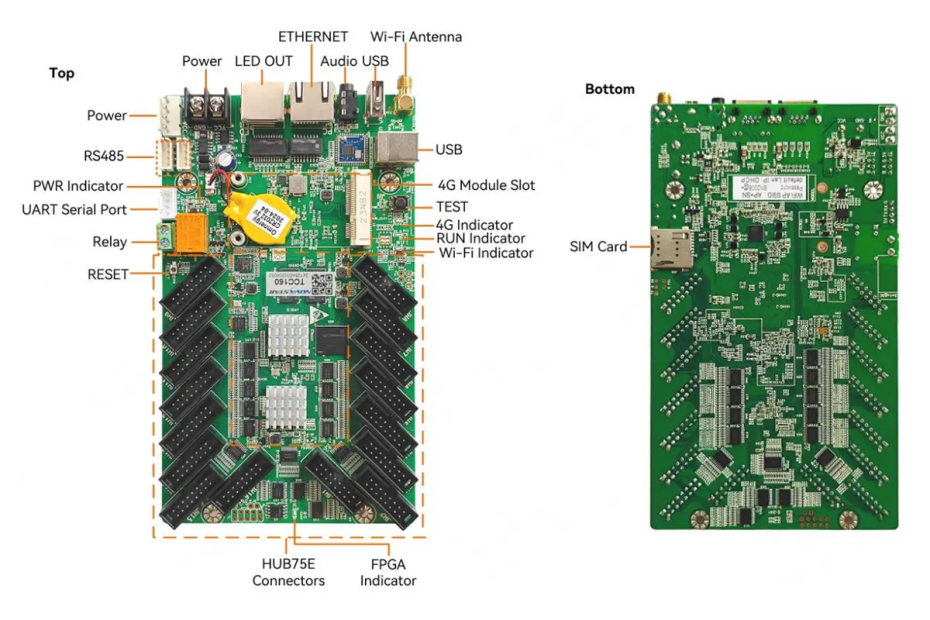
Managing your LED signage shouldn’t require multiple devices and complicated setups. The NovaStar TCC160 streamlines everything by combining both the sending and receiving functions into one powerful control card. In this guide, we’ll walk through its standout features—from effortless remote management to reliable 4K playback—and compare it with traditional control cards like the HD-C16C and 5A-75B to help you choose the best solution for your LED display project.
Catalogue
1.What is the NovaStar TCC160 control card
2. NovaStar TCC160 control card Specifications
3.Why Do Your led signage Need TCC160 control card?
4.Ideal Applications for the TCC160 Control Card
5.Powerful Connectivity: Wi-Fi, 4G, and Cloud Control
6.Step-by-Step: How to Get Started with Your TCC160 control card
7.TCC160 vs. Traditional Control Card HD-C16C,5A-75B
8.FAQs
1.What is the NovaStar TCC160 control card
The NovaStar TCC160 is a next-generation asynchronous LED signage control card built for modern digital signage applications. Unlike traditional systems that require separate sending and receiving hardware, the TCC160 integrates both functions into a single, powerful unit. This all-in-one design allows users to publish content, schedule playback, and manage their LED displays remotely through cloud control platforms. With its stable performance, simplified setup, and strong compatibility, the NovaStar TCC160 makes LED display management easier, smarter, and far more efficient.
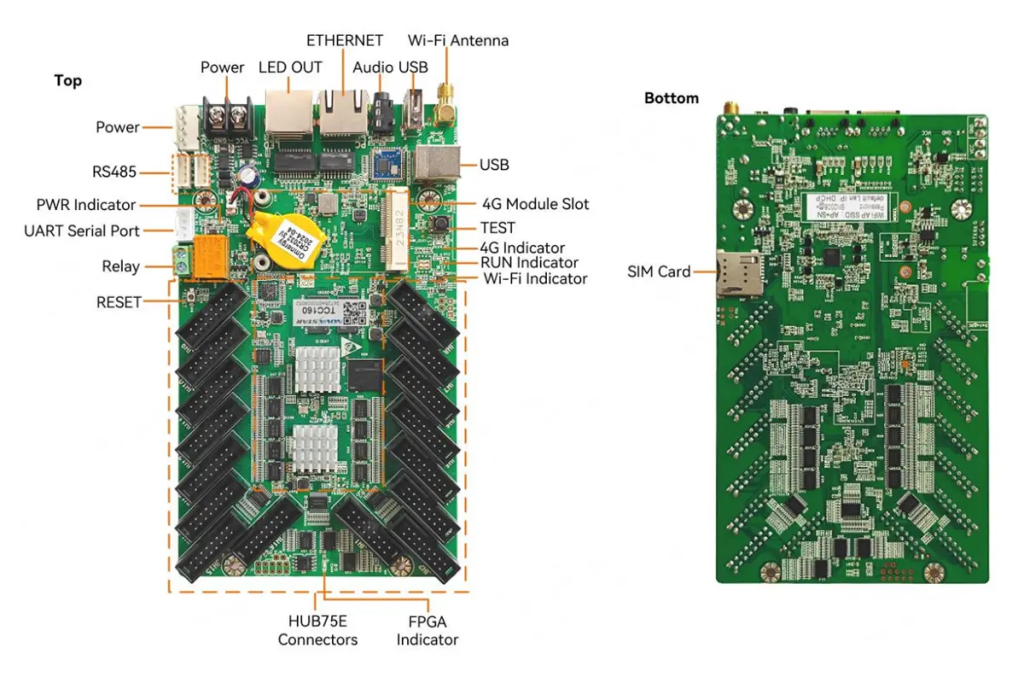
Key highlights include:
Integrated Wi-Fi and Ethernet connectivity
Support for ultra-long screens (up to 8192 pixels wide)
Compatibility with PWM and general driver ICs
Advanced color management and gamma adjustment
This control card is ideal for small-to-medium pixel capacity applications, making it perfect for storefronts, vehicle-mounted displays, and community information boards.
2. NovaStar TCC160 control card Specifications
| Feature | Details |
| Pixel Capacity | Up to 512×512@60Hz for PWM ICs; supports cascading for up to 650,000 pixels |
| Media Decoding | Hardware decoding of 4K videos |
| Wi-Fi Connectivity | Dual Wi-Fi AP and STA modes |
| Audio Output | Stereo audio support |
| Color Management | Standard (Rec.709 / DCI-P3 / Rec.2020) and custom color gamuts |
| Remote Monitoring | Real-time temperature, voltage, and bit error monitoring |
| Relay Functionality | Remote power on/off control |
Additionally, the TCC160 control card integrates seamlessly with NovaStar’s ecosystem, including products like the NovaStar VX1000 Pro and NovaStar VX1000, making it a versatile choice for advanced video wall controllers.
3.Why Do Your led signage Need TCC160 control card?
TCC160 is not just another control card—it’s a game-changer for led signage management. Here’s why your led signages need it:
Simplified Setup and Maintenance
With 16 standard HUB75E connectors and integrated sending/receiving capabilities, the TCC160 eliminates the need for additional hardware. Its compact design saves space and reduces cabling complexity.
Superior Performance
Equipped with a quad-core 1.4 GHz processor, 2 GB RAM, and 32 GB internal storage, the TCC160 delivers flawless playback of high-resolution videos and images. It also supports hardware decoding of 4K videos, ensuring smooth performance even under heavy loads.
Remote Accessibility
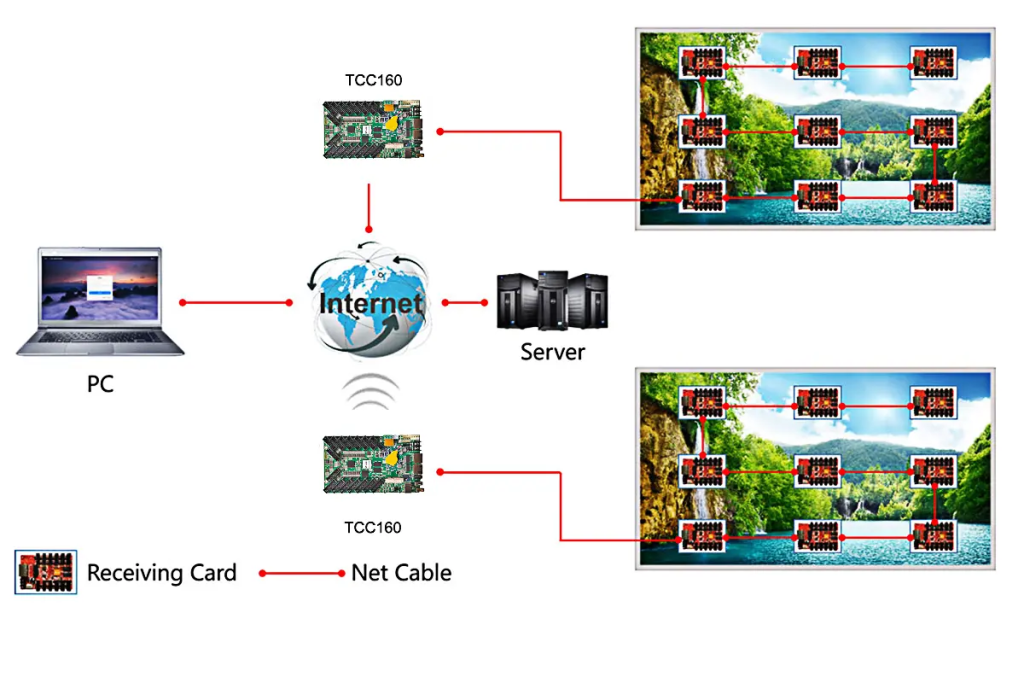
Using cloud-based platforms, you can manage your led signages from anywhere in the world. The built-in Wi-Fi and optional 4G module provide flexible connectivity options, making it easy to update content or troubleshoot issues remotely.
Enhanced Display Quality
Features like individual RGB gamma adjustment, 18-bit+ grayscale enhancement, and precise color management ensure vibrant, lifelike visuals on your led signages.
4.Ideal Applications for the TCC160 Control Card
The TCC160 is designed for applications requiring small-to-medium pixel capacities. Some ideal use cases include:
Retail Storefront Displays
Its integrated design and Wi-Fi/4G connectivity allow for effortless remote content updates from a central office or even a smartphone. Showcase high-resolution product videos and promotions without the need for a dedicated on-site computer, keeping your messaging fresh and engaging.
Vehicle-Mounted & Public Transit Advertising
With its operating temperature range of -40°C to +80°C and support for 4G modules, it can broadcast content reliably in harsh environments. Update playlists in real-time via the cloud as the vehicle moves through different areas, maximizing the impact of your mobile advertising campaigns.
Community & Corporate Information Boards
The controller’s low power consumption and dual Wi-Fi mode (AP for direct local access, STA for internet connection) offer maximum installation flexibility. Use the relay control to automatically power the display on/off on a schedule, saving energy and extending lifespan.
Lamp-Post & Digital Out-of-Home (DOOH) Media
Its compact size saves crucial space in confined lamp-post cabinets. Cloud-based monitoring allows operators to check the status (temperature, voltage, errors) of hundreds of displays from a single dashboard, dramatically reducing on-site maintenance costs and ensuring maximum uptime.
5.Powerful Connectivity: Wi-Fi, 4G, and Cloud Control
One of the TCC160’s standout features is its robust connectivity options. Let’s take a closer look:
Wi-Fi AP and STA Modes
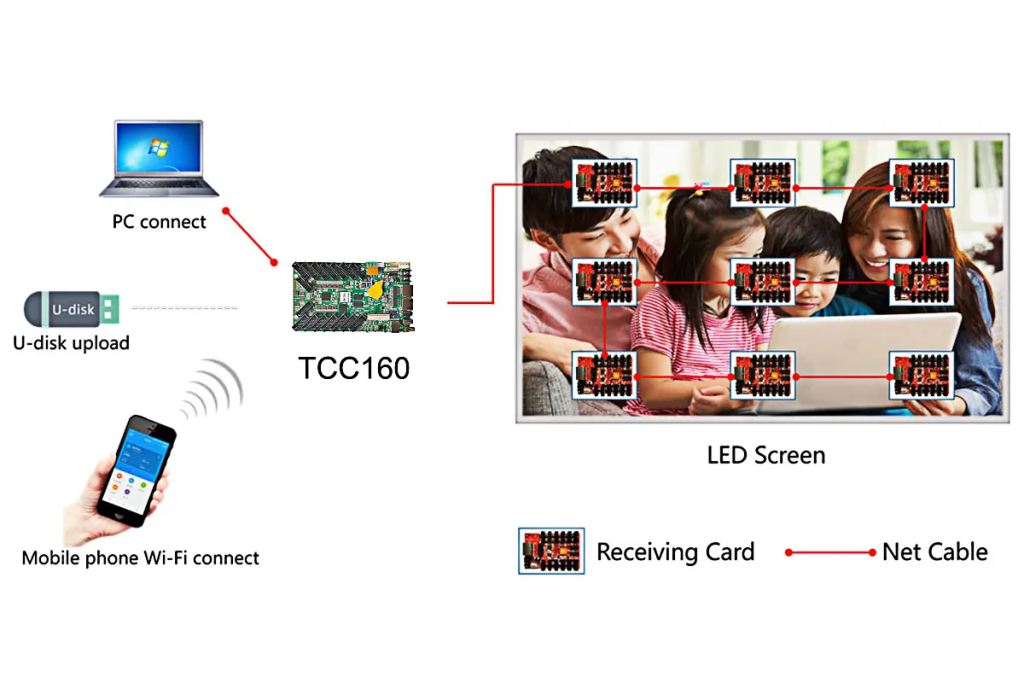
The dual Wi-Fi functionality allows the TCC160 control card to act as both a hotspot (AP mode) and a client (STA mode). This flexibility ensures reliable connections in various environments.
Optional 4G Module
For locations without stable internet access, the TCC160 supports optional 4G modules, enabling seamless remote management.
Cloud-Based Control
NovaStar’s cloud platform empowers users to monitor and control their led signages from anywhere. Whether you’re using a computer, mobile phone, or tablet, the TCC160 ensures effortless content management.
6.Step-by-Step: How to Get Started with Your TCC160 control card
Getting your TCC160 control card up and running is straightforward. Follow this practical, step-by-step guide to go from unboxing to publishing content.
Step 1: Hardware Connections
Power: Connect a 5V~12V DC power source to the POWER port.
LED Screen: Use HUB75E cables to connect from the TCC160’s 16x HUB75E connectors to your LED modules.
Network (Choose One):
Wired: Plug an Ethernet cable from your router to the ETHERNET port.
Wireless: Attach and orient the included Wi-Fi antenna to the Wi-Fi Antenna connector.
Step 2: Initial Configuration & Connection
Power on the device. The red PWR indicator should light up, and the green RUN indicator will flash every 2 seconds.
On your computer or phone, search for a Wi-Fi network named “AP” followed by the last 8 digits of the TCC160’s serial number (found on the product label). Connect to it using the default password also printed on the label.
Open the NovaLCT software on your computer to discover and connect to the TCC160.
Step 3: Screen Configuration & Content Publishing
In NovaLCT, set up your LED screen parameters (e.g., resolution, module type) to match your hardware.
Use the software to create playlists, then drag and drop your images, videos, and other content. Finally, send the playlist to the TCC160.
Your content will now play seamlessly on the led signage.
Step 4: Ongoing Monitoring & Management
For remote access, configure the TCC160’s Wi-Fi STA mode in NovaLCT to connect to your local network, or insert a 4G module (sold separately).
Use NovaStar’s cloud platforms (e.g., NovaCloud) to monitor screen status, including real-time temperature and voltage data, from anywhere.
7.TCC160 vs. Traditional Control Card HD-C16C,5A-75B
How does the TCC160 stack up against older models like the HD-C16C and 5A-75B? Let’s compare:
| Feature | NovaStar TCC160 (2024 All-in-One) | HD-C16C (2021 All-in-One) | 5A-75B (2016 Receiving Card) |
| Product Type | Integrated Sender & Receiver | Integrated Sender & Receiver | Dedicated Receiving Card |
| Max. Pixel Capacity | Up to 650,000 (Cascaded) | 524,288 (Theoretical) | 256×256 per card, Massive cascading (65,536 cards) |
| Processing & Memory | Quad-core 1.4 GHz, 2GB RAM, 32GB Storage | 4 GB Flash Memory | N/A (Relies on separate sender) |
| Connectivity | Dual Wi-Fi (AP/STA), Ethernet, Optional 4G | Wi-Fi, Ethernet, Optional 4G | Ethernet only (requires external sender) |
| Video Decoding | Hardware 4K @60fps | Hardware 1080p @60fps | Basic support (via sender) |
| Cloud Integration | Yes, Native | Limited | No |
| Ideal Use Case | Modern retail, vehicle-mounted, remote managed displays | Cost-effective all-in-one for small-medium fixed installations | Large-scale, high-refresh-rate video walls and complex shaped screens |
8.FAQs
Is the TCC160 conrol card compatible with Novastar vx1000 Pro?
Yes, the TCC160 integrates seamlessly with the NovaStar VX1000 Pro and other NovaStar video wall controllers, enhancing its versatility for large-scale installations.
Can i use the TCC160 for video walls?
Absolutely! While the TCC160 control card is optimized for small-to-medium pixel capacities, it supports cascading for larger displays, making it suitable for video wall applications.
Does the TCC160 require professional installation?
No, the TCC160 is designed for easy setup. However, for complex installations, consulting a professional is recommended.
What certifications does the TCC160 control card have?
The TCC160 is certified for CE, FCC, RoHS, and TBK compliance, ensuring safety and reliability.