In the world of advertising and promotions, P3 Smart LED Posters are making waves as a dynamic and effective tool for businesses. These digital LED signages are not just eye-catching but also provide flexibility and ease of use that traditional posters can’t match. In this article, we’ll explore how to utilize P3 Smart LED Posters effectively and why they are a worthwhile investment for your business.

Understanding P3 Smart LED Posters
Before diving into the usage, it’s crucial to understand what P3 Smart LED Posters are. Essentially, they are high-resolution digital displays that can show various types of content, from images and videos to animations. The “P3” denotes the pixel pitch, which in this case is 3 millimeters, indicating the distance between the center of two adjacent pixels. A smaller pixel pitch means higher resolution and better image quality, making P3 an excellent choice for indoor displays.
Features and Benefits
P3 Smart LED Posters are packed with features that make them stand out in the realm of digital signage. Here are some key benefits:
- High Resolution: With a pixel pitch of 3mm, these posters offer crisp and clear visuals, perfect for detailed content.
- Easy Content Management: Content can be updated remotely, allowing for quick changes and real-time updates.
- Versatility: They can display a wide range of content, including static images, videos, and interactive media.
- Energy Efficient: Despite their brightness and clarity, LED posters consume less power compared to traditional lighting.

Setting Up Your P3 Smart LED Poster
Setting up a P3 Smart LED Poster is a straightforward process, but it requires careful attention to detail to ensure optimal performance.
Installation Process
- Choose the Right Location: The first step is to select a suitable locati0n for your LED poster. Consider areas with high foot traffic for maximum visibility.
- Mounting: Depending on the design, P3 Smart LED Posters can be wall-mounted or placed on stands. Ensure that the installation is secure and stable.
- Power and Connectivity: Connect the poster to a power source and ensure it has access to your network for content updates. Most modern LED posters support Wi-Fi connectivity, making this step hassle-free.
Software Setup
Once the hardware is in place, it’s time to configure the software:
- Install the Management Software: Most P3 Smart LED Posters come with proprietary software for managing content. Install this software on your computer or device.
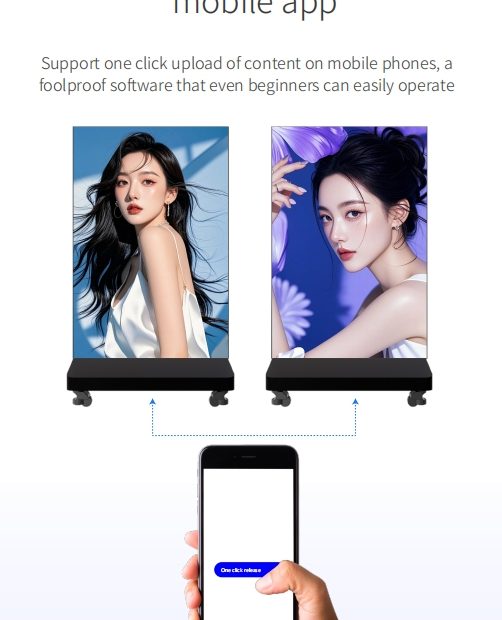
- Content Upload: Use the software to upload your content. This can include images, videos, and animations that you want to display.
- Scheduling: Set up a schedule for your content. This feature allows you to display different content at different times, maximizing the impact of your advertising.
Creating Effective Content
The success of your P3 Smart LED Poster largely depends on the quality of the content you display. Here are some tips for creating engaging content:
Visual Appeal
- High-Quality Images and Videos: Ensure that the images and videos you use are of high resolution. Poor-quality visuals can diminish the impact of your message.
- Consistent Branding: Maintain consistent branding elements such as logos, colors, and fonts to reinforce brand identity.
Messaging
- Clear and Concise: Keep your messages short and to the point. Viewers should be able to grasp the message within seconds.
- Call to Action: Include a compelling call to action to encourage viewers to engage with your brand.

Maintenance and Troubleshooting
To keep your P3 Smart LED Poster functioning at its best, regular maintenance is essential.
Routine Maintenance
- Cleaning: Regularly clean the display to remove dust and fingerprints. Use a soft, dry cloth to avoid scratching the screen.
- Software Updates: Keep the management software updated to the latest version to ensure smooth operation and access to new features.
Troubleshooting Common Issues
- Connectivity Problems: If you experience connectivity issues, check the network settings and ensure that the poster is within range of your Wi-Fi signal.
- Display Errors: If the display is not functioning correctly, restart the system or contact technical support for assistance.
P3 Smart LED Poster Price and ROI
Investing in a P3 Smart LED Poster is a decision that can yield significant returns. While the initial cost may be higher than traditional signage, the benefits far outweigh the expenses.
Cost Considerations
The price of P3 Smart LED Posters varies based on factors like size, brand, and additional features. However, the cost is often justified by the enhanced visibility and flexibility these posters provide.
Return on Investment
By attracting more attention and allowing for dynamic content updates, P3 Smart LED Posters can lead to increased customer engagement and higher sales, providing a substantial return on investment.
Conclusion
P3 Smart LED Posters are a powerful tool in the world of digital signage. Their high-resolution displays, ease of use, and versatile content options make them a valuable addition to any business looking to enhance its advertising strategy. By understanding how to set up, maintain, and create effective content for these posters, you can maximize their potential and see a significant boost in your promotional efforts.
Embrace the future of advertising with P3 Smart LED Posters and watch your business grow.