In many splicing display applications, the full-screen display function is frequently used. This allows multiple screens to be seamlessly connected, creating a single large display, such as an LCD video wall. However, to achieve this kind of display setup, you’ll need to adjust your splicing screens into one unified screen, which requires additional control processing devices.
But how exactly do you do this? The key lies in understanding the structure of a complete splicing screen system. A typical splicing screen setup is composed of three main parts:
- The Splicing Screen – This is the display component where the images are shown on the LCD video wall.
- The Signal Source – This can be a computer or a monitor that provides the input signal.
- The Control Processing Device – This device, located between the splicing screen and the signal source, is responsible for adjusting the multiple screens into one unified display.

To adjust multiple splicing screens into a single large display, you can use one of four devices, each offering different levels of functionality. Let’s take a closer look at each:
1. Distributor
The distributor is the simplest of the control devices. It typically uses an HDMI interface, with a configuration of one input and multiple outputs. For example, common setups include 1 in 4 out, 1 in 8 out, or 1 in 16 out, where:
- 1 in means one computer input.
- 4 out, 8 out, 16 out refer to how many splicing screens can receive the signal on the LCD video wall.
The distributor’s primary function is straightforward: it takes the signal from one computer and sends it to multiple splicing screens. This device is suitable for situations where you only have a single computer signal and wish to display it across several screens, forming a single cohesive display. It does not support multiple inputs or advanced display features, and is only ideal when you need to mirror the same content across all screens.

2. Matrix
The matrix offers more advanced functionality than the distributor. Like the distributor, it uses HDMI input and output interfaces, but it allows for multiple computer inputs and multiple outputs to splicing screens. Common configurations include 4 in 8 out, 8 in 16 out, and so on, often used in LCD video wall setups.
For example, a 4 in 8 out matrix can support up to 4 computers, each displaying its signal across up to 8 splicing screens. This setup allows for:
- Displaying the image from one computer across all screens as a full-screen display.
- Selecting and switching between images from multiple computers to display on any screen or multiple screens simultaneously.
The matrix adds flexibility to the splicing screen system by supporting multiple signal inputs and enabling easy switching between computers. It’s ideal for environments where different content needs to be displayed from several sources, like in command centers, security monitoring rooms, or large-scale control systems.
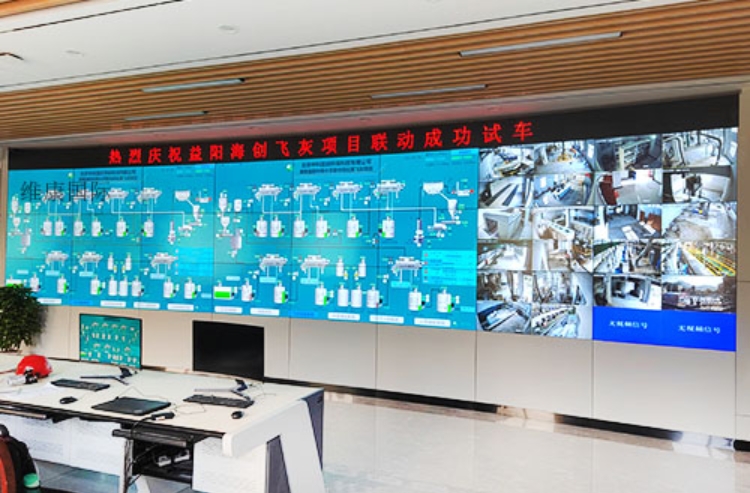
3. Decoder
The decoder combines many of the functions of the matrix, but it is more specialized for video wall control, often used in monitoring rooms or command centers. While the decoder can be used to adjust the splicing screens into one large screen (like the matrix), it’s particularly useful when the system needs to handle both computer and monitoring signals at the same time.
For example, if the front-end input includes both video surveillance signals and computer outputs, a decoder can manage both simultaneously. This removes the need for a separate matrix and allows for:
- Combining computer and monitoring signals on the same display.
- Enabling the entire spliced screen, such as an LCD video wall, to show a unified large display or separate monitoring signals across multiple sections of the screen.
This makes the decoder an efficient and compact solution for monitoring rooms where both types of signals need to be displayed simultaneously on the same screen array.
4. Image Processor
The image processor is the most versatile device in a splicing screen system. It can perform almost all the tasks needed in a complex display environment, especially in LCD video wall setups. Some of its key functions include:
- Adjusting multiple screens into a single large screen (full-screen display).
- Supporting multiple computer inputs, similar to a matrix.
- Performing decoding functions, like a dedicated decoder.
- Enabling advanced features like image roaming, superimposing images, and picture-in-picture (PiP), where multiple video windows are displayed simultaneously.
Image processors are commonly used in large command centers or environments where the display setup requires sophisticated features such as content switching, advanced multi-screen layouts, or real-time image manipulation. These devices offer high flexibility for complex display needs and are well-suited for professional environments that require both functionality and versatility.
Conclusion: Choosing the Right Device for Your Splicing Screen Setup
Adjusting a splicing screen into one unified large display, like an LCD video wall, is a basic function of modern control devices, but each device offers different capabilities. Here’s a quick summary of when to use each:
- Distributor: Ideal for small setups with a single computer input and simple full-screen display across multiple screens.
- Matrix: Best for setups with multiple computer inputs and output needs, where switching between sources or displaying multiple signals is required.
- Decoder: Useful when the signal sources are both computer and monitoring signals, and you need a dedicated solution for complex monitoring environments.
- Image Processor: The most versatile option, suitable for large command centers or situations where advanced display functions like image manipulation, PiP, and multiple inputs are required.
If your splicing screen setup is relatively simple, and you’re only handling a few screens with minimal input, a distributor or matrix may be sufficient. However, for more complex setups with a variety of signal sources and advanced display requirements, an image processor or decoder might be the most practical choice for managing an LCD video wall.