In today’s information age, ultra HD touchscreen panels have become indispensable equipment for enterprises, schools, and various institutions. With a plethora of options available in the market, selecting the best all-in-one touchscreen flat panel to meet your specific needs can be daunting. This article delves into essential tips for choosing the right touchscreen flat panel solutions, helping you find the ideal device for your requirements. In this ultimate guide, you will learn everything to ensure you are choosing the best interactive touch screen displays for your business.
Understand the Basic Performance Parameters of Touchscreen Flat Panels
Screen Size
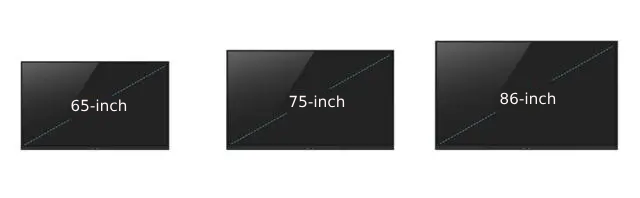
Choose an appropriate screen size based on your usage scenario and viewing distance. Typically, touchscreen flat panels for collaboration range from 55 to 98 inches. Larger sizes are ideal for expansive conference rooms, while smaller sizes might be more suitable for classroom settings. When selecting, think about the ultimate guide to finding the best interactive touch screen displays for your particular business environment.
Resolution
High resolution is crucial for clear, sharp images. For applications such as image processing and video playback, opt for an ultra HD touchscreen panel or a touchscreen flat panel with high resolution (3840×2160 or higher) to ensure optimal picture quality. These tips are crucial when creating the ultimate guide to selecting the best interactive touch screen displays for your business.

Brightness
The brightness of the touchscreen flat panel directly impacts image clarity, especially in well-lit environments. A good touchscreen flat panel should have a brightness level between 300 and 500 nits to maintain clear visuals under various lighting conditions. So, brightness is one factor to consider in this guide to choosing interactive touch screen displays that meet your business needs.

Contrast
Higher contrast ratios enhance the depth and detail of images. For the best visual effects, look for touchscreen flat panels with a contrast ratio of over 5000:1. As part of your decision-making process, ensure that the ultimate guide you look at covers choosing the best interactive touch screen displays with excellent contrast for your business.
Response Time
For smooth display of high-speed moving images, a shorter response time reduces screen blur. Aim for a response time of less than 8 milliseconds in your professional touchscreen flat panel to ensure clear and fluid motion. Remember, when looking for the ultimate guide to finding the best display, response time is key for interactive touch screen displays in business use.

Expansion Interfaces
Ensure the touchscreen flat panel has multiple expansion interfaces, such as HDMI, VGA, and USB, to connect various devices. Models with wireless projection capabilities offer added convenience and flexibility. Such features are essential in the guide to choosing the best interactive touch screen displays for any business.
Consider Additional Features of Interactive Flat Panel Screens
Operating System
Interactive flat panel screens generally come with either Android or Windows operating systems. Android systems offer a user-friendly interface with a wide range of applications, while Windows is better suited for office environments and supports various office software. In the ultimate guide to choosing the best interactive touch screen displays, understanding the operating system is crucial for business decisions.

Intelligent Interaction
All-in-one touchscreen flat panels that support touch interaction, handwritten annotations, and other intelligent features enhance usability for meetings and educational demonstrations. Consider models with voice assistants for added convenience. Intelligent interaction features are an essential part of the ultimate guide to choosing the best interactive touch screen displays for your business.

Touch Technology
Modern interactive flat panel screens typically use capacitive touch technology for direct hand interaction. Some advanced models incorporate electromagnetic touch, which provides a superior handwriting experience. The ultimate guide to choosing interactive touch screen displays should factor in the type of touch technology that best fits your business needs.

Evaluate Brand, Price, and After-Sales Service
Brand
Quality and after-sales service are often better with established brands. Look for professional touchscreen flat panel options from reputable brands, known for their reliability and support. This is critical in the ultimate guide to choosing the best interactive touch screen displays for your business.
Price
The price of touchscreen flat panel solutions varies based on performance, features, and brand. Within your budget, select a model that offers a good balance of functionality and quality. Balancing price effectively is part of the ultimate guide to finding the best interactive touch screen displays for your business.
After-Sales Service
Understand the after-sales service policy, including warranty periods and repair services. Opt for brands and retailers that offer comprehensive support to address any issues that may arise during use. When following the ultimate guide to choosing the best interactive touch screen displays, consider after-sales service for the long-term benefits of your business.
Recommended Touchscreen Flat Panel
The screensculpt smart interactive tablet all-in-one integrates both Windows and Android operating systems, providing a seamless experience with wireless screen sharing capabilities. Available in 55, 65, 75, 86, 98 inches, it supports optional OPS modules and features a smart plug-and-play design for easy use and maintenance. This versatile, professional touchscreen flat panel is an excellent choice for enhancing collaboration and presentations in any setting. This recommendation is key in the ultimate guide to choosing the best interactive touch screen displays for your modern business.
By considering these factors, you can choose the perfect touchscreen flat panel for your needs, whether for education, business, or collaborative environments. Therefore, it is essential to follow the ultimate guide to make an informed decision when selecting the best interactive touch screen displays tailored to your business requirements.